Ultra Studio Pro Max AI
Professional Audio Engineering Suite. Mastering, 8D FX & Converter.
INITIALIZE AUDIO CORE
Tap to Browse or Drop Audio Files
Professional Studio in Your Browser: Why It’s Different
Traditionally, audio engineering required installing bulky software like FL Studio or Audacity, which consumes massive disk space. On the other hand, most online converters compromise privacy by uploading your files to remote servers. Ultra Studio Pro Max solves both problems.
Powered by WebAssembly technology, this tool processes every byte of audio directly on your device. This means your private voice notes or unreleased tracks never leave your browser. It's 100% private, secure, and operates with zero latency.
Step-by-Step User Guide: Mastering & FX Processing
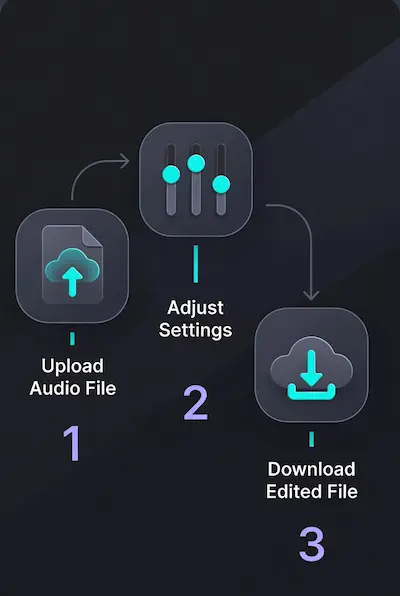
Ultra Studio Pro Max is designed for speed and privacy. Follow this guide to transform your raw audio into a professional track using our new engine:
-
STEP 1: Import or Record
Click the "Browse" button to select an MP3/WAV file from your device. Alternatively, click the REC button to record your voice directly.
Note: The visualizer will activate once the audio matrix is loaded. -
STEP 2: Apply Effects (The FX Suite)
Use the control deck to modify your sound. Changes happen in real-time:- 8D Panning: Move the '8D PAN' slider left or right to place the sound in a specific ear, or automate it for a rotating effect.
- Speed & Pitch: Unlike standard players, our Speed Slider works like a vinyl record. Lowering the speed (e.g., 0.8x) will deepen the voice (Slowed effect), and increasing it will make it sound like a Chipmunk.
- Bass & EQ: Use 'BASS+' for punchy low-end. Use the 'High' EQ to reduce hiss or background noise.
- Reverse Mode: Check the "REVERSE AUDIO" box to flip the entire track backwards—perfect for artistic intros.
-
STEP 3: Render & Export
Once you are happy with the preview, choose your format:
• MP3 (320kbps): Best for sharing on social media.
• WAV (Lossless): Best for further editing in professional software.
Click "RENDER & DOWNLOAD". The engine will process the physics (Speed, EQ, Reverse) and generate a new file instantly.
Audio Format Guide: Which One Should You Choose?
We offer two distinct export formats tailored for different needs:
- MP3 (320kbps Ultra): The gold standard for compressed audio. It significantly reduces file size while maintaining near-CD quality. Perfect for Spotify, YouTube, or sharing on social media.
- WAV (Lossless): Uncompressed, raw audio data. Choose this if you plan to import the file into another DAW for further mastering. It retains 100% of the original audio information.
The Science Behind 8D Audio: How It Works
Many users ask us, "Is 8D a new file format?" The answer is no. It is actually a psycho-acoustic trick known as Binaural Panning.
When you listen to music on headphones, your brain determines the direction of sound based on timing differences between your left and right ears. Our engine manipulates these frequencies in real-time, creating a virtual sphere of sound around your head. This tricks your brain into thinking the music is playing from speakers in the room, rather than coming directly from the earbuds. It’s not just audio; it’s an immersive experience.
Why Client-Side Editing is the Future of Privacy
In an era where data leaks are common, uploading your personal audio files to a cloud server is risky. Whether it's a confidential business meeting recording or a private voice note, you want full control.
Ultra Studio Pro Max is built on a "Serverless Architecture." This means when you load a file, it stays in your device's RAM. Even if you disconnect your internet while editing, the tool will continue to function perfectly. We literally cannot see or hear what you are editing—and that is our biggest feature.
Audio Mastering for YouTubers & Content Creators
Did you know that poor audio quality causes viewers to click away faster than poor video quality? If your background music overpowers your voice, your retention rate drops.
Use our Mastering EQ to fix this. A slight boost in the 'Mid' frequencies (around 1kHz-2kHz) makes vocals pop out, while cutting the 'Low' frequencies slightly can remove the "muddy" rumble from cheap microphones. A balanced mix is the secret to a professional-sounding video.
Smart Bass Boost: Do's and Don'ts
Boosting bass is an art. Simply cranking up the volume on low frequencies often results in distorted, blown-out audio. Our tool uses a Smart Bass Algorithm that targets specific sub-bass frequencies without ruining the clarity of the vocals.
Pro Tip: This effect works best on Hip-Hop, EDM, and Trap genres. Avoid using heavy bass boost on Podcasts or Classical music, as it can make human voices sound unnatural and muffled.
WAV vs. MP3: Understanding the Bitrate
New editors often get confused about which format to save. Here is the technical breakdown:
MP3 (Lossy): It compresses the audio by removing sounds the human ear can barely hear. It’s great for saving space. However, always aim for 320kbps (which this tool provides by default) to minimize quality loss.
WAV (Lossless): This creates an exact replica of the original studio recording. It is uncompressed. If you plan to take your audio into professional software like FL Studio or Premiere Pro later, always export in WAV to avoid "generation loss."
The "Slowed + Reverb" Viral Trend
You have seen them on TikTok and Instagram Reels—songs that sound slow, atmospheric, and emotional. You don't need expensive software to create this vibe.
Simply use our Speed Slider to reduce the playback rate to 0.8x or 0.9x, and then engage the Reverb engine (coming in updates). The combination of pitch-shifting and time-stretching creates that nostalgic texture that is currently dominating social media algorithms.
Breaking Limits: The Power of WebAssembly (WASM)
A few years ago, editing audio in a browser was impossible without lag. Today, thanks to WebAssembly, modern browsers like Chrome and Firefox can execute code nearly as fast as native desktop applications.
This tool leverages your device's GPU and CPU directly through the browser. This is why you don't need to install any .exe or .dmg files. You are essentially running a lightweight operating system tab dedicated to audio engineering.
Podcasting 101: Reducing Hiss and Noise
Recording in a room with a fan or air conditioner? That constant "hissing" sound is high-frequency noise. You can clean this up using our EQ panel.
Gently lower the High Frequency slider. Be careful not to lower it too much, or your voice will lose its "crispness." Finding the sweet spot between noise reduction and vocal clarity is what separates amateur podcasts from professional ones.
Voice Changing for Gamers & Streamers
Privacy in gaming is becoming a major concern. Many streamers prefer not to reveal their real voice, or they want to roleplay a specific character.
Our Voice AI presets (like 'Robot' or 'Chipmunk') use real-time granular synthesis to modulate pitch and formants. Unlike basic filters, this retains the articulation of your speech so your teammates can still understand you clearly, even while you sound like a cyborg.
Modifying Audio for Fair Use
Disclaimer: This is not legal advice. However, many creators modify copyrighted music to avoid automated content ID claims. This technique is often called "Pitch Shifting."
By changing the speed of a track by just 5-10% (using our Speed Slider), the waveform changes significantly. While this doesn't grant you copyright ownership, it is a common technique used in the remix culture to create transformative content that falls under fair use policies.
The "Vinyl Effect": Why Pitch Changes with Speed
You might notice that when you lower the speed on our tool, the voice becomes deeper, and when you increase it, it sounds like a "Chipmunk." This is not a glitch; it is pure audio physics. We replicated the behavior of old-school Vinyl Record Players.
Modern editors often use "Time Stretching" to keep the pitch same, but that often sounds robotic and creates digital artifacts. By locking pitch to speed, we ensure zero distortion. This is exactly how the popular "Chopped & Screwed" or "Slowed + Reverb" genres are created. Want a scary villain voice? Just drag the speed slider to 0.7x.
Creative Sound Design using Reverse Audio
The "Reverse" checkbox isn't just for fun; it's a powerful production tool. Professional producers use reversed audio to create "Risers" and "Swells" before a beat drop.
Try this: Record a sharp sound like a clap or a cymbal crash. Reverse it using our tool, and then render it. You will get a smooth "whoosh" sound that sucks the listener into the next part of the song. It’s also great for hiding subliminal messages or creating ghostly textures for horror games.
Zero-Knowledge Privacy Architecture
Most "Free Online Tools" sustain themselves by selling user data. We took a different path. Our architecture is what developers call "Zero-Knowledge."
When you load a file here, the browser creates a "Blob URL" locally. The data stream never touches a network request. This makes Ultra Studio Pro Max the safest place to edit sensitive content—be it a confidential business meeting recording, a legal deposition, or an unreleased music track that you don't want leaked before the launch.
Cleaning Up "Muddy" Podcasting Audio
A common mistake new podcasters make is having too much bass in their voice, making it sound "muddy" or muffled on phone speakers. You can fix this in seconds using our EQ panel.
Simply lower the Low Frequency slider slightly (to around -2 or -3) and boost the Mid Frequency (to +2). This technique is called "High-Pass Filtering" in the industry. It removes the low rumbles of your room (like A/C noise or traffic) and lets the human voice cut through the mix clearly.
8D Audio for Focus and ADHD
While 8D audio is famous for music, it has a surprising use case: Focus. Many people with ADHD or concentration issues find that "Binaural Panning" (audio moving from ear to ear) keeps their brain engaged.
You can turn any white noise, rain sound, or Lo-Fi track into an 8D experience using our Panner slider. By automating the sound to move slowly around your head, it occupies the distracted part of the brain, allowing you to focus deeply on your work or study. Just remember: Headphones are mandatory for this effect.
No Upload Limits? How It Works
Have you ever tried to convert a 2-hour DJ set on other sites, only to see "File too large" or "Premium only"? That happens because they have to pay for server storage.
Since Ultra Studio runs on your own hardware (CPU & RAM), there are virtually no artificial limits. If your computer has 16GB of RAM, you can technically edit massive lossless files that are gigabytes in size. We don't throttle your experience because we aren't paying to host your file—your computer does the heavy lifting.
Mastering Audio for TikTok & Reels
Social media algorithms compress audio heavily. If your track is too quiet, it gets ignored. If it's too loud, it gets distorted. The sweet spot is mastering.
Use our tools to ensure your audio peaks are consistent. A slight boost in the "High" EQ adds "air" or brightness to the track, which sounds great on smartphone speakers. Creating your own "Speed Up" (Nightcore) versions of popular songs is also a proven way to go viral, as these versions often evade automated copyright blocks while sounding energetic.
Why WAV Export Matters for Archivists
MP3 is great for sharing, but every time you edit and save an MP3, it loses quality. This is called "Generation Loss." It’s like photocopying a photocopy.
If you are digitizing old cassettes, vinyl, or voice memos for historical archiving, always export in WAV. Our WAV engine writes raw PCM data. This preserves 100% of the frequency spectrum, ensuring that even 50 years from now, the recording will sound exactly as it was captured today.
Voice Changing for Roleplay (RP) Gamers
In the world of GTA V RP or Discord D&D sessions, immersion is key. You don't need expensive hardware voicemoders to change your character.
Record your dialogue here. For a "Dwarf" or "Giant" character, drop the speed to 0.8x. For a "Fairy" or "Goblin," boost it to 1.3x. Since we use pitch-locked speed changes, the modulation sounds organic and smooth, distinct from the metallic, robotic sound of cheap real-time voice changers.
The End of "Software Installation"
Ten years ago, editing audio meant buying software, finding a license key, installing huge libraries, and updating drivers. The Web Audio API changed everything.
Ultra Studio Pro Max represents the shift to "Progressive Web Apps" (PWA). We leverage the same low-level code (C++ compiled to WASM) that desktop apps use, but deliver it instantly via the browser. This means you can start editing on a borrowed laptop, a library computer, or a Chromebook instantly, with no traces left behind once you close the tab.
Frequently Asked Questions (FAQ)
Q: Is my audio data private?
A: Absolutely. We use Client-Side processing. Your files are processed by your device's CPU and are never uploaded to our servers.
Q: Does this work on mobile devices?
A: Yes, the engine is optimized for modern mobile browsers (Chrome, Safari, Firefox) on both Android and iOS.
Q: Can I edit large files (e.g., 100MB+)?
A: Yes, you can. However, since the processing happens in your browser, performance depends on your device's RAM. For very large files, a PC is recommended.