Titan Auth Pro Max
Secure Client-Side 2FA Vault. No Cloud. No Leaks. Offline Capable.
Add New Account
Vault is empty.
Add your first 2FA account securely.
Why Passwords Are No Longer Enough?
In the current digital landscape, relying solely on passwords is like locking your front door but leaving the window wide open. Data breaches happen daily. If you use the same password for multiple sites, a leak in one platform puts your entire digital life—Facebook, Gmail, Binance, and Bank accounts—at risk.
This is where Two-Factor Authentication (2FA) becomes your digital bodyguard. Even if a hacker steals your password, they cannot access your account without the rotating 6-digit code generated by Titan Authenticator Pro. It adds a second layer of verification that is time-sensitive and unique to your device.
How to Use Titan Authenticator: A Step-by-Step Guide
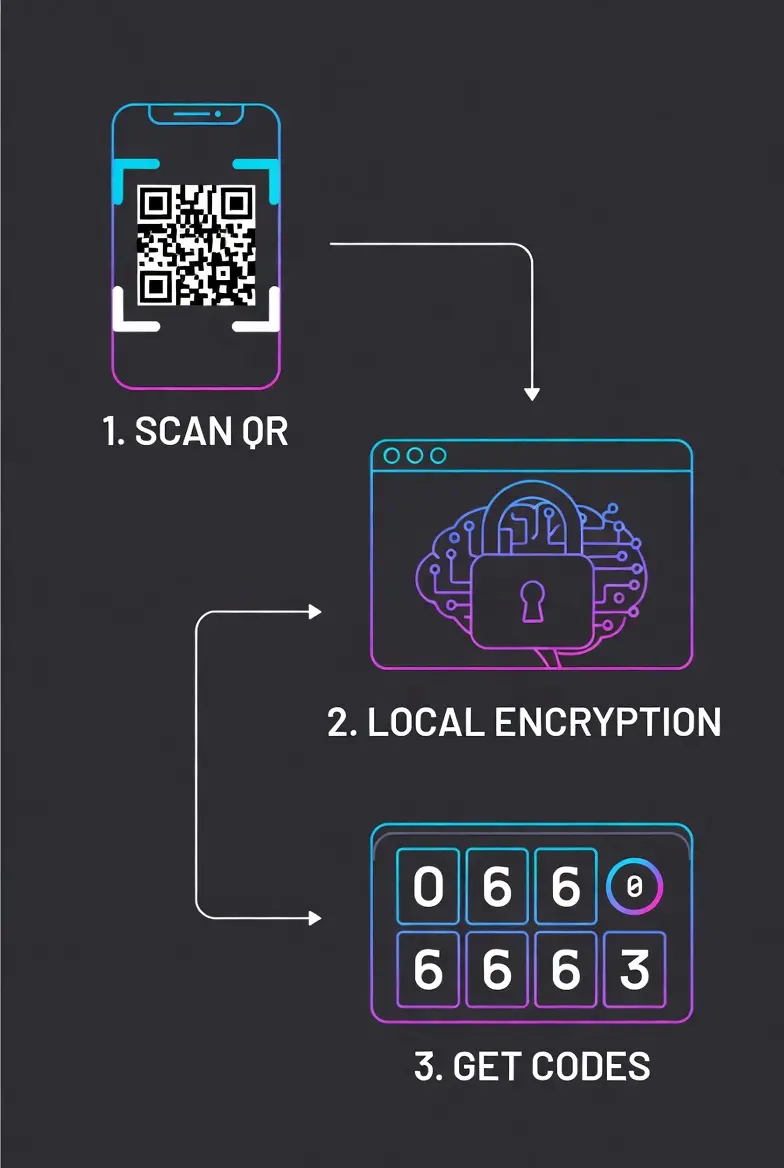
1. Setting Up Your Security PIN
When you first open the tool, go to the Security tab. Create a 4-digit PIN. This PIN is used to encrypt your database. Without this PIN, your saved keys are just gibberish code that no one can read.
2. Adding Accounts (2 Ways)
- QR Scan: Click "Add" > "Scan QR Code". Point your camera at the QR code provided by Facebook, Gmail, or Binance. If successful, the fields will auto-fill.
- Manual Entry: If you are on the same device, copy the "Secret Key" (Base32) from the service and paste it into the "Secret Key" box. Give it a name and click Save to Vault.
3. Backing Up Your Data (Crucial!)
Since we don't store your data on cloud servers, you must backup your vault. Click the Backup button to download a .json file. Store this file on a USB drive or secure cloud storage. This is your only lifeline if you lose your device.
4. Restoring & Merging
Got a new phone? Click Restore and select your backup file. You will get two options:
- REPLACE: Wipes the current list and loads the backup.
- MERGE: Keeps your current accounts and adds new ones from the backup file (Great for syncing two devices).
5. Emergency Reset
Forgot your PIN? On the Lock Screen, click "Forgot PIN? Reset Vault". Warning: This will wipe all data to let you start fresh. Use this only if you have a backup file ready to restore.
Titan Auth vs. Google Authenticator: What's the Difference?
Many users ask, "Why should I use Titan Auth over the standard Google Authenticator or Authy?" The answer lies in Data Sovereignty and Privacy.
Cloud-Based Authenticators (Google/Authy)
Most popular apps sync your secret keys to their cloud servers. While convenient, this creates a centralized target for hackers. If their cloud servers are breached (which has happened to major password managers), your 2FA keys could be exposed. Additionally, you need an internet connection to sync.
Titan Authenticator Pro (Client-Side)
Titan Auth takes a Zero-Trust approach. We do not have servers. We do not have a database. Your secret keys are:
- Stored strictly in your browser's LocalStorage.
- Encrypted using AES-256 (Military Grade) before storage.
- Accessible ONLY by you via your PIN.
This means you are in total control. No "Big Tech" company is holding your keys. Plus, it works 100% offline, making it perfect for travel or areas with poor connectivity.
Under the Hood: The Security Architecture
Transparency is key to trust. Here is exactly how we handle your sensitive data without sending it to any server:
1. The Encryption Engine
When you set a PIN, we use it as a "Salt" to encrypt your vault. We utilize the CryptoJS library to perform AES-256-CBC encryption. The result is a meaningless string of characters that can only be unlocked with your specific PIN.
2. TOTP Generation (RFC 6238)
We follow the global industry standard for Time-Based One-Time Passwords. The tool calculates a unique hash based on the current Unix Time and your Secret Key. This calculation happens locally in your device's CPU/Processor, ensuring zero latency.
3. Portable Backup System
Since we don't store your data in the cloud, we provide a robust JSON Backup feature. You can export your encrypted vault and store it on a USB drive or secure cloud storage of your choice. This gives you the freedom to move between devices without being locked into a specific ecosystem.
Expert Recommendations for Maximum Security
To get the most out of Titan Authenticator Pro, we recommend following these security protocols:
- Regular Backups: Since this is an offline tool, if you clear your browser cache effectively, you might lose data. Always download a backup file after adding a new important account.
- Strong PIN: Do not use simple PINs like "1234" or "0000". Your PIN is the only key to decrypt your vault.
- Use HTTPS: Always ensure you are accessing this tool via a secure HTTPS connection (look for the lock icon in the address bar) to prevent man-in-the-middle attacks.
Disclaimer: This tool is an open-source, client-side utility designed for privacy enthusiasts. While we use top-tier encryption standards, the security of your device (malware/viruses) is ultimately your responsibility.
The "Password-Only" Era is Dead. Here is Why.
Let's be honest for a second. How many of us use the same password for Facebook, Instagram, and maybe even a crypto wallet? It’s a common habit, but in 2026, it is a digital death sentence.
Hackers don't sit and guess your password anymore. They buy millions of leaked credentials from the dark web and run automated bots to break into accounts. This is where Titan Authenticator acts as your fail-safe. Even if a hacker has your password, they are powerless without the rotating 6-digit code that lives strictly on your device.
Think of it like a bank vault: The password is the key, but the 2FA code is the retinal scan. You need both to get in.
The Hidden Dangers of Cloud Sync
Convenience often comes at the cost of security. Popular apps like Authy or Google Authenticator urge you to sync your keys to the cloud. Sounds great until you realize that cloud servers are a centralized target for attackers.
We took a different path with Titan Auth Pro. We believe in Data Sovereignty. By keeping everything Client-Side (Local), we eliminate the risk of a mass server breach. If our website disappears tomorrow, or if hackers attack the internet infrastructure, your keys remain safe in your browser’s encrypted storage. You own your data, not us.
Why SMS Verification is No Longer Safe?
If you are still using SMS for your 2FA codes, stop immediately. There is a growing threat called "SIM Swapping". Hackers can trick your mobile carrier into transferring your phone number to their SIM card. Once they have your number, they get your OTPs.
Titan Authenticator generates codes mathematically using the TOTP Protocol locally on your device. It doesn't care about your phone number, carrier signals, or SIM cards. This makes it completely immune to SIM swapping attacks, making it the preferred choice for Binance traders and banking apps.
"I Lost My Phone!" – How to Prevent Disaster
The biggest fear with offline authenticators is losing the device. Since we don't spy on your data, we can't recover it for you. But don't worry, we built a robust solution.
The Golden Rule of Backups:
Whenever you add a high-value account (like Gmail or Coinbase), immediately use our Export/Backup feature. It downloads a `.json` file containing your encrypted vault.
- Step 1: Download the backup file.
- Step 2: Rename it to something boring (e.g., `biology_notes_2025.json`) so nobody gets curious.
- Step 3: Store it on a USB drive or a secure cloud storage like Google Drive.
If your phone breaks, simply upload this file to Titan Auth on a new device, enter your PIN, and you are back in business instantly.
A Zero-Knowledge Architecture
In a world where apps track your every move, Titan Authenticator is a ghost. We built this tool with a "Zero-Knowledge" architecture.
What does that mean? It means the code runs 100% in your browser. When you type your secret key or scan a QR code, that data never leaves your device. We don't have analytics, we don't have a database, and we don't have admin panels to view your keys. It is just you and the algorithm.
This transparency is why security professionals prefer web-based, open-source solutions over closed-source mobile apps that might be sending telemetry data behind your back.
The "Airplane Mode" Security Test
Do you trust this tool? You shouldn't trust blindly. We encourage you to perform the "Airplane Mode Test".
Load this page, then immediately turn off your internet or switch to Airplane Mode. Now, try to generate codes or add a new secret key. You will see that Titan Authenticator works perfectly without internet.
Why does this matter? Most phishing sites require an active connection to send your stolen data to their servers. Since our logic runs entirely in your browser's RAM (Client-Side), there is no "secret tunnel" sending your keys to us. Your data never leaves your device.