Gmail Alias Generator
Generate Unlimited Unique Aliases for Privacy & Testing. No Data Stored.
You can enter just a username (defaults to Gmail) or a full custom email.
Master Your Digital Footprint: One Email, Infinite Possibilities
In today's digital landscape, handing over your primary email address to every website is a recipe for spam and security risks. But creating a new email account for every service is impossible. Enter the Advanced Alias Generator.
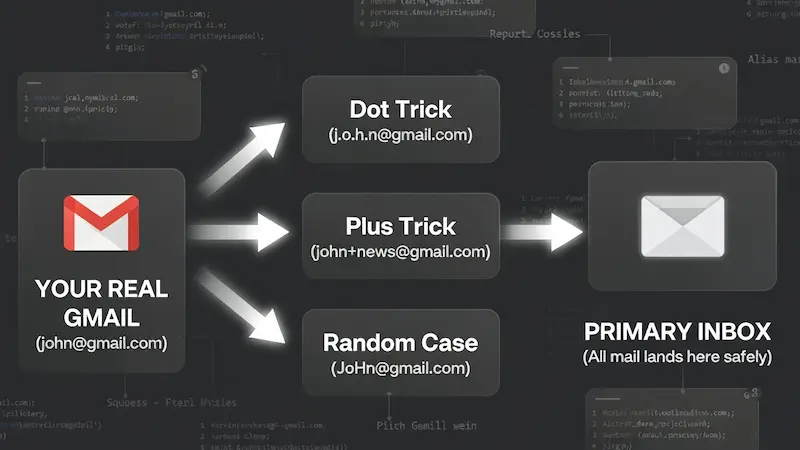
Visualizing how aliases protect your real email address while keeping your inbox unified.
This tool isn't just a randomizer; it is a privacy shield. By leveraging standard email protocols (RFC 5233), it allows you to transform your single Gmail or custom domain address into thousands of unique variations. All emails sent to these aliases arrive safely in your main inbox, but you gain the power to filter, track, and block them individually.
How to Use: Step-by-Step Guide
Follow these simple steps to generate thousands of secure aliases in seconds:
-
Enter Input: Type your username (e.g.,
john) or full email address in the first box. - Choose Quantity: Select how many variations you need from the dropdown list.
-
Configure Settings:
- Dot Trick (.): Inserts random dots within the username.
- Plus Trick (+): Appends a tag like
+news. You can choose between random characters or input your own custom tags (separated by commas). - Random Case: Randomizes uppercase and lowercase letters for the Username, Suffix, AND Domain (e.g.,
UsEr@GmAiL.cOm). Great for bypassing filters.
- Generate & Export: Click the Generate button. Once complete, use Copy All or Export .TXT to save your new aliases.
Smart Ways to Use These Aliases
Professionals and privacy enthusiasts use this tool daily. Here is how you can get the most out of it:
-
Detect Data Leaks: Use a unique alias for every sign-up (e.g.,
name+facebook@...). If that email starts receiving phishing links, you know that specific service suffered a data breach. - Developers & QA Testers: Need to test a signup form 50 times? Instead of creating 50 fake accounts, generate 50 valid aliases in seconds to verify email delivery and user flows.
-
Organize Your Inbox: Set up filters in your email settings. For example, automatically move all emails sent to
name+newsletter@...into a "Read Later" folder, keeping your primary inbox clean.
Our Privacy Guarantee
We believe privacy tools should be private. Unlike other generators that process data on a server, Trusted Tools Web operates 100% Client-Side.
This means the email address you type in the input box never leaves your browser. The calculation happens right on your device (phone or computer). We do not store, save, or transmit your email address to anyone—not even ourselves.
The "First Order" Discount Hack
We all love those "Get 20% off your first order" coupons, but they usually limit you to one per email. With this generator, you don't need to create a new Gmail account every time. Just generate an alias like myname+nike1@gmail.com, then +nike2, and so on. The store thinks it's a new customer, but the coupon code lands right in your main inbox. It’s the smartest way to shop online.
Catching Data Sellers Red-Handed
Ever wonder how a random insurance company got your email? Use a specific alias for every service. If you sign up for a gym membership using name+gym@gmail.com and suddenly start receiving spam emails from a car dealership on that exact address, you have proof. You know exactly who sold your data, and you can block that specific alias without affecting your other emails.
Managing Multiple Social Profiles
Social media managers often struggle with platforms like Twitter or Instagram that require a unique email for every handle. Instead of juggling passwords for ten different Gmail accounts, use aliases. You can have agency+clientA@gmail.com and agency+clientB@gmail.com. All verification codes come to one place, making your workflow incredibly smooth and organized.
A QA Engineer's Best Friend
If you are building an app, you need to test the "Sign Up" flow hundreds of times. Manually creating emails is a waste of time. Our bulk generator allows you to grab 1,000 valid emails instantly. You can run automated tests to check if your database handles user registration correctly without cluttering your system with fake temporary mails that expire too soon.
The Digital "Burner" Strategy
Signing up for dating apps or meeting people online requires caution. You don't always want strangers to have your primary email address which might be linked to your LinkedIn or Facebook. Use an alias like name.date@gmail.com. It keeps your real identity somewhat obscured until you trust the person, adding an extra layer of personal security.
Organizing Your Job Hunt
Job hunting can be chaotic. Emails from recruiters often get lost among newsletters and bills. Try using a dedicated alias like name+jobs@gmail.com for all your applications. Then, set up a filter in Gmail to star these emails or play a specific sound when they arrive. You will never miss an interview call again because it got buried in the 'Promotions' tab.
Decluttering: The "Inbox Zero" Secret
Newsletters are great until they take over your life. Instead of unsubscribing one by one, start subscribing with name+news@gmail.com. Create a rule in your email settings to automatically skip the inbox and move these to a folder named "Read Later." Your main inbox stays clean for important personal and work communication, while your reading material waits for the weekend.
Outsmarting "One Account" Rules
Some websites have strict rules allowing only one account per person. However, many of them have "lazy" coding. They might check if user@gmail.com exists, but they fail to realize that U.s.e.r@gmail.com is the same person. Our "Random Case" and "Dot Trick" features exploit these technical oversights, giving you access where others are blocked.
The Security "Kill Switch"
If your primary email gets onto a hacker's list, you are in trouble. But if you used an alias like name+adobe@gmail.com and that specific service gets breached, you are safe. You can simply create a filter to delete all incoming mail to that specific alias. It acts like a kill switch for compromised accounts, protecting your master inbox from phishing floods.
Squeeze More Out of Free Trials
Software services (SaaS) often offer 7-day trials. sometimes 7 days isn't enough to evaluate a complex tool. By using aliases, you can legally extend your evaluation period. Sign up for another week using a fresh alias to ensure the software really meets your needs before you commit to a monthly subscription. It’s smart consumerism.
Why Not Just Use "10-Minute Mail"?
You might have seen sites offering "Temporary Emails" that self-destruct. While they are fun, they are dangerous for serious accounts. Imagine signing up for a crypto exchange or a social media account using a temporary mail. If you ever forget your password, that account is gone forever because the email no longer exists.
This Generator is different. Since these aliases are based on your real Gmail, you own them forever. You get the privacy of a fake email with the security of a permanent inbox. It is the best of both worlds.
The "Credential Stuffing" Defense
Hackers often use a technique called "Credential Stuffing." If a small website gets hacked and leaks your email/password, hackers try that same combination on Facebook, Amazon, and PayPal. Since most people use the same email everywhere, it often works.
But if you use a unique alias for every site (like user+amazon@gmail.com), this attack fails completely. Even if hackers get your login from one site, they cannot guess your username for any other site. It is a simple habit that makes you nearly unhackable.
A Secret Weapon for Freelancers & Agencies
If you manage social media accounts or ads for multiple clients, logging in and out is a nightmare. Most platforms (like Twitter or Instagram) require a unique email for every account.
Instead of creating 10 different Gmail accounts for 10 clients, just use: agency+clientA@gmail.com, agency+clientB@gmail.com, etc. All verification codes come to your main inbox, but the platforms treat them as completely separate users. It saves hours of setup time.
Frequently Asked Questions
Does this work with Yahoo or Outlook?
The "Plus (+)" trick works with almost all major providers including Outlook, Yahoo, and iCloud. However, the "Dot (.)" trick is specific to Gmail and Googlemail. If you use a custom domain hosted on Google Workspace, both tricks will work perfectly.
Is generating these aliases legal?
Absolutely. You are simply using the standard formatting features provided by email service providers (RFC standards). You are not hacking or altering the email system; you are just using its built-in features more smartly.