Ultra Diff Pro Max
Securely Compare Text, JSON, HTML or Code Instantly. No Data Stored.
Secure Code Comparison: Why It Matters
In the world of development, even a single missing comma or a changed word can cause errors. But finding these small differences manually is prone to human error.
Ultra Diff Pro Max solves this instantly with a strict Client-Side Only policy. Unlike other tools that upload your files to a cloud server, our engine runs entirely within your browser's memory.
- No Data Uploaded to Server
- Works 100% Offline
- Safe for API Keys & Passwords

How to Use: Step-by-Step Guide
New to diff checking? Don't worry. We have designed this tool to be the easiest difference checker on the web. Follow the visual guide below or read the steps.
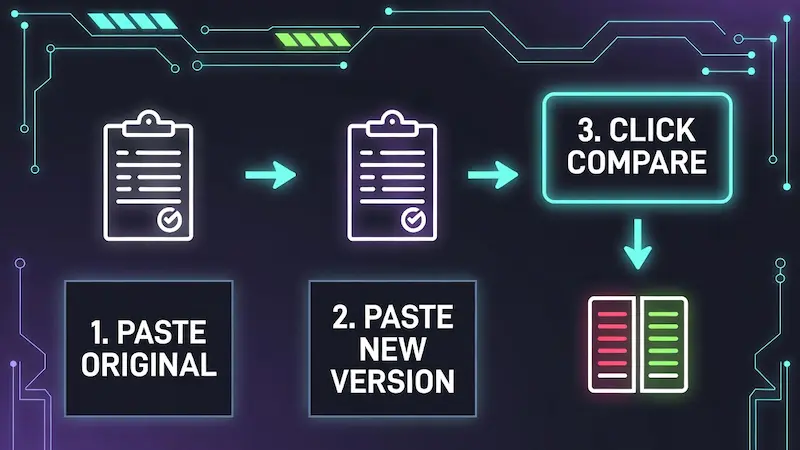
Figure: 3-Step Easy Process
-
Input Your Data:
Paste your original text or code into the left box (labeled ORIGINAL) and the new version into the right box (labeled MODIFIED). -
Clean Up (Optional):
- Beautify: Click this to format messy JSON or minified code into a readable structure before comparing.
- Minify: Use this if you want to compare file sizes by removing extra spaces.
-
Run the Comparison:
Click the gradient "COMPARE DIFFERENCES" button. The tool will instantly analyze every character. -
Analyze & Export:
● Red Lines = Removed content.
● Green Lines = Added content.
Use the "Save Report" button to download the comparison as an HTML file for your records.
Under the Hood: Features for Pro Developers
We built this tool because basic text checkers weren't enough for modern workflows. Here are the advanced features that make Trusted Tools Web different:
- JSON/Code Beautifier: Don't waste time formatting code manually. Our built-in beautifier handles messy JSON, CSS, and HTML instantly so you can compare logic, not whitespace.
- Minification Support: Need to compare file sizes? You can minify your code directly here to see the compact version.
-
Smart Diff Algorithm: We use a character-by-character analysis (using the
jsdiffengine), which means we spot even the smallest typos that line-by-line checkers often miss.
Developer Insights: Optimizing Your Workflow
Taming the JSON Monster
We've all been there—trying to read a JSON response from an API that is just one long, endless line of text. Instead of using a separate formatter, paste that raw data here and hit the "Beautify" button. We instantly expand it into a readable tree structure before comparing it, saving you from "bracket blindness."
Debugging Minified Code
When you are trying to reverse-engineer a bug on a production site, you often only have the minified (compressed) JS or CSS. Comparing two minified files is impossible. Use our tool to first Format/Beautify both versions, and then run the diff. It turns a chaotic mess into a clear, line-by-line debugging session.
Server Config Validation
Sysadmins know the pain of a broken server after a "minor" config change. Before deploying an `nginx.conf` or `.htaccess` file, compare the working backup with your new version here. Seeing that one accidental extra space or missing semicolon in Red/Green highlights can save your server from downtime.
The "Split" vs "Unified" Debate
Which view should you use? We included both for a reason. Use Split View when the files are vastly different and you need context. Switch to Unified View when you only want to see the specific lines that changed (like a Git commit log). It’s about choosing the right perspective for the job.
Cleaning Up Copy-Paste Errors
Copying code from StackOverflow or ChatGPT often brings unwanted hidden characters or spacing issues. By comparing your typed code against the copied snippet, you can instantly spot if an elusive "invisible character" is breaking your script.
Content & SEO: Maintaining Quality
Tracking Content Updates
For SEO specialists updating old blog posts: Put the old article on the left and the refreshed one on the right. This lets you confirm that you have successfully injected your new keywords without accidentally removing crucial backlinks or existing optimized headings.
Plagiarism and Paraphrasing Check
If you outsource content writing, you need to verify originality. While this isn't a database scanner, it's perfect for checking how much an article has been "rewritten" from a source text. If the diff shows 90% matching text (white/grey lines), you know it wasn't paraphrased enough.
Email Template Verification
Sending out a newsletter? HTML email templates are fragile. A small change in the table structure can break the layout on mobile. Compare your new template version against the last known working template to ensure only the text changed, not the core structural tags.
Legal & Contract Review
Freelancers and agencies often sign renewed contracts. Don't just sign blindly. Run a diff between last year's contract and the new one. Our tool will highlight exactly which clauses were altered, added, or sneakily removed, protecting you from bad terms.
Managing Translation Files
For multi-language websites using JSON or XML for translations: It's easy to miss a key. Compare the English JSON file with the Spanish version to see if the structure matches or if you forgot to translate a specific line item.
Security First: Why Local Processing Wins
The "Air-Gap" Method
Paranoid about security? You should be. Here is a pro tip: Load this page, then physically disconnect your internet or turn off Wi-Fi. The tool continues to work perfectly. This proves that no code is being sent to our servers. You can diff confidentially and reconnect only when you are done.
GDPR and Data Compliance
Since we don't collect, store, or process your data on a backend server, using Ultra Diff Pro Max simplifies your compliance. You don't need to worry about cross-border data transfer regulations because the data never leaves your own computer's RAM.
No Database Logs
Many free tools save "recent snippets" to a public feed or internal logs to train AI. We don't have a database attached to this tool. Once you close this tab or hit the "Clear" button, your work is gone forever—exactly how secure sessions should be.
Protection Against SQL Injection
Developers often test SQL queries here. Since the processing is client-side, there is zero risk of an SQL injection attack compromising a server. It’s a sandbox environment that is safe for testing malicious-looking code strings without fear.
Client-Side Encryption Logic
While this tool compares text, the philosophy behind it is built on the same logic as client-side encryption wallets. We provide the interface (the code), but you hold the keys (the data). This architectural choice is deliberate to ensure maximum trust.
Tips & Tricks for Power Users
Reducing Eye Strain
Staring at white screens all day hurts. That's why we default to a high-contrast Dark Mode with neon accents. The syntax highlighting (Red for removed, Green for added) is calibrated to be distinct but not blinding, allowing you to work longer sessions comfortably.
Mobile Diffing on the Go
Most dev tools break on mobile. We designed the "Ultra Diff" interface to be touch-responsive. If you need to check a quick code fix sent by a colleague while you are away from your desk, the stacked editor view on mobile makes it possible without zooming in and out.
Using the "Swap" Feature
Sometimes you paste the "New" code in the "Old" box by mistake, and the diff shows everything as "Deleted" (Red) instead of "Added" (Green). Don't re-paste. Just hit the Swap icon (arrows) in the middle control bar to instantly flip the contents and fix the comparison direction.
Saving Your Report
Need to show your boss what changed? Instead of taking a screenshot, use the "Save Report" feature (if available in your version) or simply print the page to PDF. The print CSS is optimized to show the difference view clearly for documentation.
Minify to Save Bandwidth
Before deploying a finalized CSS or JS file, use our "Minify" tool to strip out comments and whitespace. Then, compare it with the original to ensure no actual code logic was accidentally removed during the compression process.
Frequently Asked Questions
Is my data really safe?
Absolutely. Unlike server-side tools, Ultra Diff Pro Max processes everything locally on your browser. We do not store, track, or transmit your text inputs. You can even disconnect your internet after loading the page, and the tool will still work perfectly.
What languages are supported?
It works with any plain text format. This includes programming languages like JavaScript, Python, PHP, HTML, CSS, C++, and data formats like JSON and XML. It also works great for regular articles or essays.
Is this tool free to use?
Yes, this tool is 100% free forever. We support the development and maintenance of Trusted Tools Web through unobtrusive advertising, ensuring you get professional-grade utilities without a subscription fee.